I have only tried this in PC mode, as my phone has a stylus already. The software is on the website, easy to find and download, however it is not signed by Microsoft so it throws a warning when installing it. I don't really like installing unsigned drivers, but I wanted to set the shortcuts and customize it, so I installed it anyway.
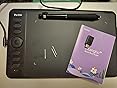
You can use it as-is in default mode without the drivers. Windows 10 recognized it right away and it started working as an absolute position tablet. With the drivers you can swap to mouse mode if you prefer. I have a touch pad, and a mouse already, so I left it in absolute position mode.
I used the cable, but it also supports bluetooth as well. When you unplug it the light flashes blue and it is ready to pair. If I were to use this on my android phone I would probably use bluetooth instead of an OTG cable.
The feel is great, it even lets you adjust the pressure curve, I tweaked it so that there is little change at low pressure, and then it ramps up quickly as you press. This felt more natural when using it to draw vectors.
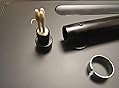
It seems to be well made and thought out. The pen even comes with spare tip storage in the "eraser" area of the stylus, and it has a tool to pull out the old tip.












Report