The cost of an external hard drive from WD, Toshiba, Seagate, and Lacie can be substantial. But those who have an extra SATA hard drive has an easy and cheap solution. You can take that old hard drive from your laptop, say you upgraded to solid state, and still get good service from it. All you would need is a hard drive enclosure, like the subject of this review.
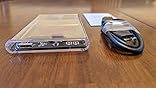
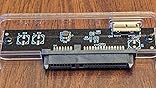
This is a hard drive enclosure. Basically, you would install your own SATA hard drive inside this case. You can then use it like an external hard drive. An external hard drive is great for backing up your data and storing large amounts of data. Most mid to high end laptops today come with solid state drives. Unfortunately, they tend to be rather small in capacity. You do not want to use up that precious space with data that you do not access all the time. Like say photos, videos, and email archives. Data such as those are best stored on an external hard drive. Windows 10 also has a built in backup utility. You can attach an external hard drive to your computer and have it backup every hour, every day, however often you wish.
An external hard drive used as a backup device is the best data insurance you can have. That data can then be taken off-site, to say a safety deposit box at your bank. It is easy to build your own external backup drive. You only need two items: a 2.5" hard drive and this ORICO hard drive enclosure. No tools are needed. You can buy a brand new hard drive and this ORICO case and the purchase price is still less than what you would pay for a comparable device from WD and Seagate. Sure, you won't get their software, but Windows 10 already has a backup utility.
You can choose your own speed and performance. Buy a 7200 rpm drive for faster data transfers. If you want the best reliability possible, spend a little extra money and buy a WD RED or Seagate Ironwolf 2.5" hard drive. All those drives will work inside this ORICO hard drive enclosure.
Most people backup their data on a USB thumb drive. Which is better than nothing. But a robust mechanical hard drive is still the best device to use. This is even more true if the data is important. Some people store their data on Microsoft's One drive and Google's Drive. That is fine, but let us be honest, some people have data that they wish to keep private. Anything you upload to the cloud is no longer under your control. Your cow has left the barn once you upload. Who knows how long Microsoft and Google will keep that data even after you delete it. They backup their servers. Maybe you have a video of you and your significant Other during an intimate moment. Do you really want to trust Google with that data? Because you know, your privacy is their main priority, right? I would trust MS and Google to store things like school reports, homework, grocery list, etc. But anything potentially embarrassing, no way. Your personal life should stay that way, personal. Do not upload potentially embarrassing data to the cloud.
Anyway, this is what I recommend. Buy a good quality 2.5" hard drive and this ORICO enclosure and build your own external backup device. You choose the capacity, performance, and reliability. For important data, look for a hard drive like WD Red. Yes, they are pricey but also very durable. Those WD Red drives are designed for use in network storage devices. They are robust.
This model is for the USB 3.0 connection. Those who have a Macbook Air (these laptops only have USB C ports) will have to use the model with a USB-C connector.
Highly recommended.









Report